The Things You Have to Do

“Ability and necessity dwell in the same cabin.” – Dutch Proverb

I recently had some trouble in my kitchen. My refrigerator had leaked intermittently for a dozen years. The floorboard underneath it finally got soaked enough that the wheel on the front left side fell through it. I had to shimmy the refrigerator out, assess the damage, fix the floorboards, and order a new frig.

It was a pretty intense week trying to get all that done so that the floor was sturdy and level enough for a new refrigerator. But when it was all done, I had a good laugh. Because… I don’t like to clean my frig. And now I had a beautifully clean refrigerator.

It reminds me of another task people don’t often like to do — update their web site design. It’s what my co-host Vicki Atkinson and I talk about this week on the Sharing the Heart of the Matter podcast: Episode 90: Site Design and WordPress Themes.

I know, I can hear you groaning from here. In fact, I’m groaning right along with you even though this is a large part of what I’ve done professionally for 30 years. Even if you only publish a private blog for your family, making things findable is important!

So if you are thinking about changing up your site or even just wondering if you should, I think there are some good tactics to help make this manageable.

Vicki and I talk through some of the design considerations to be mindful of like navigation and search. And then we look at the sections to consider when picking a theme like the header, footer, and sidebar.

I talk through some of the problems I’ve heard people have encountered when switching themes in WordPress like content disappearing and inability to revert back. I offer some strategies for avoiding that flavor of disappointment and disaster.

There is a presentation that gives these elements and examples to download as a companion piece to this podcast. Here’s the thing – tackling site design isn’t always fun, but it’s better when we do it together with some good approaches and tactics.

I’m confident you’ll love the scenic and beautiful places we explore as we share the power of storytelling as told through well-designed sites.

We know you’ll love it!

Search (and subscribe!) for Sharing the Heart of the Matter on Apple, Amazon, Spotify or Pocket Casts OR Listen to it from your computer on Anchor: Episode 90: Site Design and WordPress Themes

HoTM Episode 90 transcript

AND subscribe to our YouTube channel to see a video clip of each story: @SharingtheHeartoftheMatter.

Links for this Episode:

The PDF presentation of the ideas and process presented in this podcast conversation.

Vicki’s book about resilience and love: Surviving Sue

My book about my beloved father: Finding My Father’s Faith

(featured photo from Pexels)

Categories

Life is full of surprises and serendipity. Being open to unexpected turns in the road is an important part of success. If you try to plan every step, you may miss those wonderful twists and turns. Just find your next adventure-do it well, enjoy it-and then, not now, think about what comes next.” – Condoleeza Rice

When I first started using WordPress, I wasn’t blogging as much as just using it as a place to store a series of posts I was doing on social media as a response to the ugliness of the 2016 election cycle. I put all those posts in a category called antidotetomeanness and didn’t put any thought into categories overall.

Then when I started blogging in earnest, I still didn’t put much thought into categories and generally dumped them in a category called meditation, thinking that would cover almost any pondering on life.

Which is a little shame on me moment because I create information architectures for companies for a living – that is, I help them design the ways to store information that is structured, findable and meaningful for those who need to find it. Of course a lot of people, especially the younger generation, just use search to find things but if things are tagged appropriately we can also create effective navigation to guide people to things we think are most relevant.

But to be fair, I wasn’t sure what I was going to be writing about and wanted to be findable. Now that I have some experience under my belt, I wanted to put some thought into categories and maybe update my navigate to point to things I post about regularly – like my dad’s humor cards and the confidence series I’ve been working on.

I had a few questions:

  1. If I updated a post to change how it’s categorized would it email all my followers to notify them and create an email storm? The answer is thankfully, no.
  2. If I create a parent category like “archive” could I make a menu item for the navigation that would automatically include all the posts that I rearranged to be sub-topics?

Yes! When I created the parent topic, it had 0 posts in the top-level category but still if I navigate to the page for the category, it shows me all the posts that make up the subcategories and I can also add it to the navigation menu if I want to.

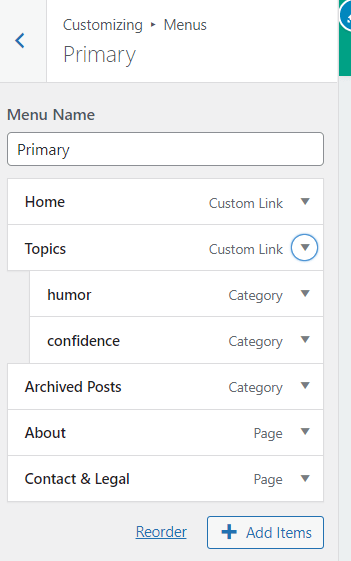
3. I wanted to create a menu header for my regularly used topics so that it provided a place for a drop-down menus of my two most common categories: humor and confidence. I ended up created a page for “topics” and then used that to anchor the sub-menu items for my categories:

Once I started to get comfortable with the answers, I had a lot of fun playing around with categories and how they can be useful. It’s opened a whole new level about how I can make things fun and findable on my home page.

Do you use categories? Do you plan them out or just add them as needed?

(featured photo from Pexels)

Data With a Grain of Salt

Not everything that can be counted counts, and not everything that counts can be counted.” – Albert Einstein

Talking with some blogging friends the other day, the topic of blog views came up. We were discussing all the different reasons that view numbers could be less this year than last year: people’s attention spans getting shorter, maybe viewers read more when the pandemic shut down other activities and now they are reading less, etc..

I’m too new to blogging to have enough historical data of significance, but I’ve studied similar data in my professional life to know that numbers aren’t as concrete as we think. So I did some digging and thought I’d share the results of my research specific to WordPress.

First of all – what is a view?

According to the WordPress stats and insights page it is:

“The two main units of traffic measurement are views and visitors:

  • view is counted when a visitor loads or reloads a page.
  • visitor is counted when we see a user or browser for the first time in a selected time frame.

visitor is an individual looking at your site. A visitor can view many different pages of your site or view the same page multiple times. Therefore, the views number is typically higher than the visitors number.”

With those definitions in mind. Here are some things that impact the numbers.

  • If a viewer reads your content in the body of email notification and never clicks on any links within the email, it doesn’t count as a view.
  • If a viewer reads and/or likes your content in the WordPress viewer but does not click through to the full post, it does not count as a view.

One of the blogs that I write for has changed in the last few months so that when posts are emailed out, they no longer have a “like” link at the bottom, just the “comment” link. However posts that come from my blog still have both “like” and “comment” links at the bottom. Some posts are emailed out with just the summary and then something like “click here to read the full post.” For people who are reading blog posts in email like I do, those three differences are going to impact the number of views.

There are some things that WordPress makes a point not to count as a view – search engines and views from anyone that has logged in and who has authoring permissions. Generally speaking, there are trying to report how many views of the content by readers as accurately as they can.

The technology is constantly changing so things like a change in the format of the notifications by email or even how well the WP Reader performs on a mobile device can impact things like view numbers. Numbers as reported within a week are probably pretty accurate in relation to each other because the functionality is consistent. There are likely seasonal differences with dips in summer and holidays. Year over year numbers, comparing the same month this year to the same month last year, is very interesting data but needs to taken with a grain of salt.

If a blog has a drop in views, it’s possible that it’s because the author(s) has alienated the viewers or our collective attention span has gone to seed. But since the trend over time for active bloggers is towards more followers and views, it also might be worth considering these technical factors as well.

For those of you who are interested in more information on the many way people read blog posts from two incredibly talented writers and experienced bloggers, both Ashley and Claudette have covered the topics in depth and by survey here:

Ashley Peterson’s post on How Do You Read Blog Posts? on her Mental Health @ Home blog.

Claudette Labriola’s survey results of How Do You Read Blogs on her Writer of Words, Etc blog

(featured photo from Pexels)