
“Life is full of surprises and serendipity. Being open to unexpected turns in the road is an important part of success. If you try to plan every step, you may miss those wonderful twists and turns. Just find your next adventure-do it well, enjoy it-and then, not now, think about what comes next.” – Condoleeza Rice
When I first started using WordPress, I wasn’t blogging as much as just using it as a place to store a series of posts I was doing on social media as a response to the ugliness of the 2016 election cycle. I put all those posts in a category called antidotetomeanness and didn’t put any thought into categories overall.
Then when I started blogging in earnest, I still didn’t put much thought into categories and generally dumped them in a category called meditation, thinking that would cover almost any pondering on life.
Which is a little shame on me moment because I create information architectures for companies for a living – that is, I help them design the ways to store information that is structured, findable and meaningful for those who need to find it. Of course a lot of people, especially the younger generation, just use search to find things but if things are tagged appropriately we can also create effective navigation to guide people to things we think are most relevant.
But to be fair, I wasn’t sure what I was going to be writing about and wanted to be findable. Now that I have some experience under my belt, I wanted to put some thought into categories and maybe update my navigate to point to things I post about regularly – like my dad’s humor cards and the confidence series I’ve been working on.
I had a few questions:
- If I updated a post to change how it’s categorized would it email all my followers to notify them and create an email storm? The answer is thankfully, no.
- If I create a parent category like “archive” could I make a menu item for the navigation that would automatically include all the posts that I rearranged to be sub-topics?

Yes! When I created the parent topic, it had 0 posts in the top-level category but still if I navigate to the page for the category, it shows me all the posts that make up the subcategories and I can also add it to the navigation menu if I want to.
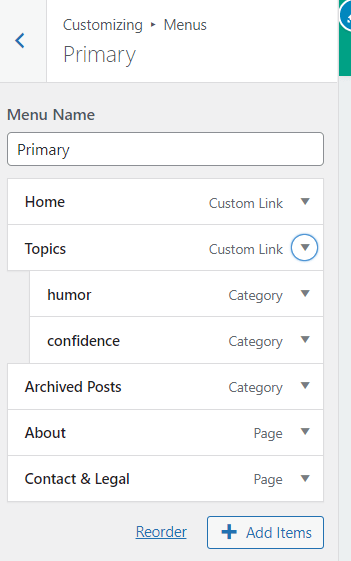
3. I wanted to create a menu header for my regularly used topics so that it provided a place for a drop-down menus of my two most common categories: humor and confidence. I ended up created a page for “topics” and then used that to anchor the sub-menu items for my categories:
Once I started to get comfortable with the answers, I had a lot of fun playing around with categories and how they can be useful. It’s opened a whole new level about how I can make things fun and findable on my home page.
Do you use categories? Do you plan them out or just add them as needed?
(featured photo from Pexels)
 Surprised By Joy